PātakaPortals

A front door for students. Another for whānau.

Staff are not the only people who need a window in. Students and families each get their own, built for a phone, showing only what is theirs.

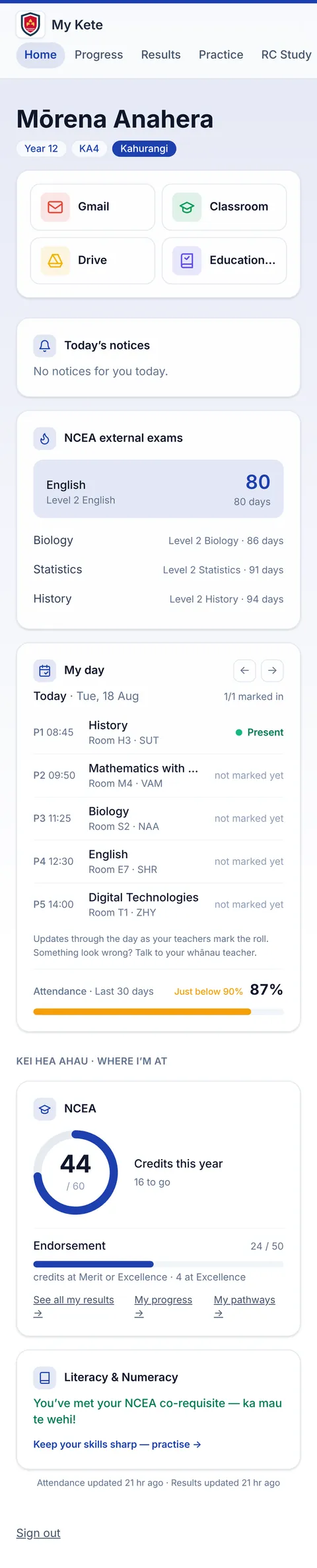
The student portal on a phone: a greeting, shortcuts, exam countdowns and today's timetable.
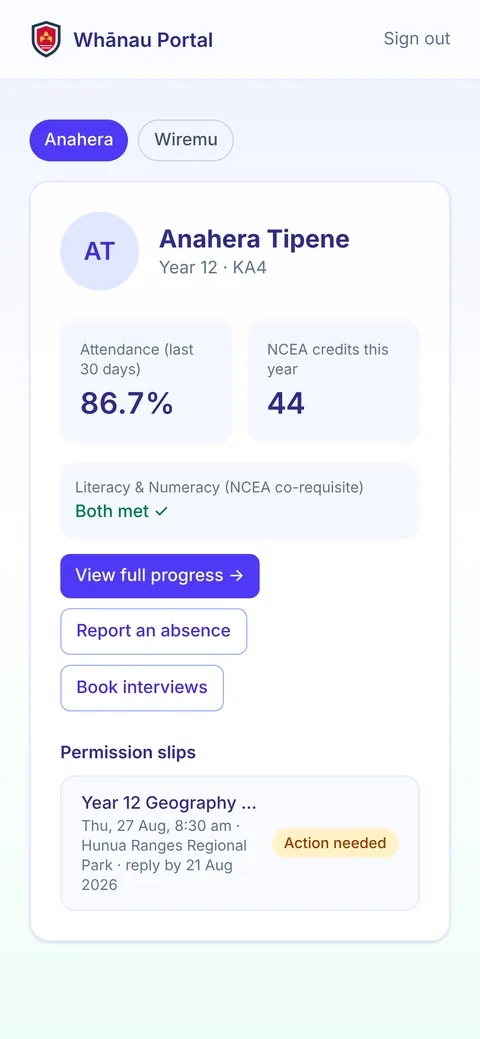
The whānau portal on a phone: a child's attendance and credits, and a permission slip needing action.

Nothing to install

Both portals run in the browser on any phone and can be saved to the home screen.

No password for whānau

Caregivers enter their email and get a secure link, or use the Google or Microsoft account they already have.

Only what is theirs

A student sees their own information. A caregiver sees their own children and nobody else's.

01

Students: My Kete.

Students sign in with their school Google account. The first screen is today: the timetable with attendance as the roll is marked, exam countdowns, and credits against the target.

  • Progress towards NCEA, including literacy and numeracy
  • Timetable, daily notices and what is on
  • Results and academic summary
  • Practice tasks that mark themselves
  • Careers links and pathways
The student portal scrolling on a phone: shortcuts, NCEA exam countdowns, today's timetable with attendance, and credit progress.
02

Whānau: their children, on one screen.

For each child: progress, attendance, effort grades, results, merits and awards, and who their teachers are. A permission slip that needs an answer is flagged on the first screen.

  • Report an absence
  • Book parent and teacher interviews
  • Sign permission slips and pay for trips
The whānau portal on a phone: a child's attendance and NCEA credits, buttons to report an absence and book interviews, and a permission slip needing action.
03

A slip, start to finish.

Here is the whole thing at phone size: open the slip, read it, give permission, sign and submit. It reaches the teacher's consent tracker straight away.

How trips and consent work

A recording of a caregiver opening a permission slip on a phone, reading it, giving permission, typing their name and submitting.

What staff get out of it.

See what they see

From any student's page, staff can open a read-only preview of the student or caregiver portal. Useful when a parent rings.

Absences arrive as a worklist

Absences reported by caregivers reach the office as a list to work through, and export to KAMAR.

Interviews book themselves

Caregivers book parent and teacher interviews online, and every teacher gets a schedule.

Email caregivers

Email every caregiver, a year level or one form class, with each family addressed individually.

Keep looking.

Come and see it running.

A demo is the platform itself, not a slide deck. Tell us what your school is wrestling with and we will show you the part of Pātaka that deals with it.

Book a demo