In daily use at Rosehill College, Papakura

Your whole school. One system.

Pātaka is the school platform built inside a New Zealand secondary school. Forty live modules, one sign-in, and every screen already knows who you are and what you are allowed to see.

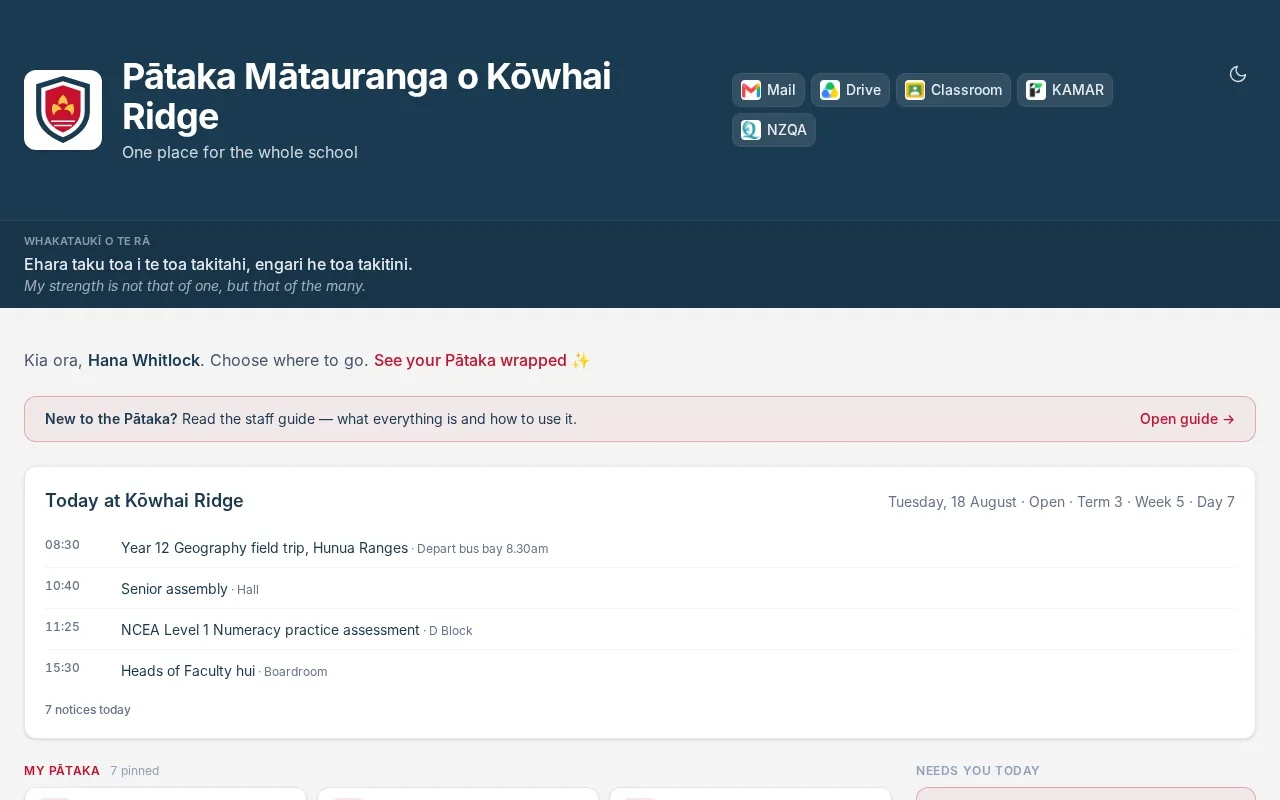
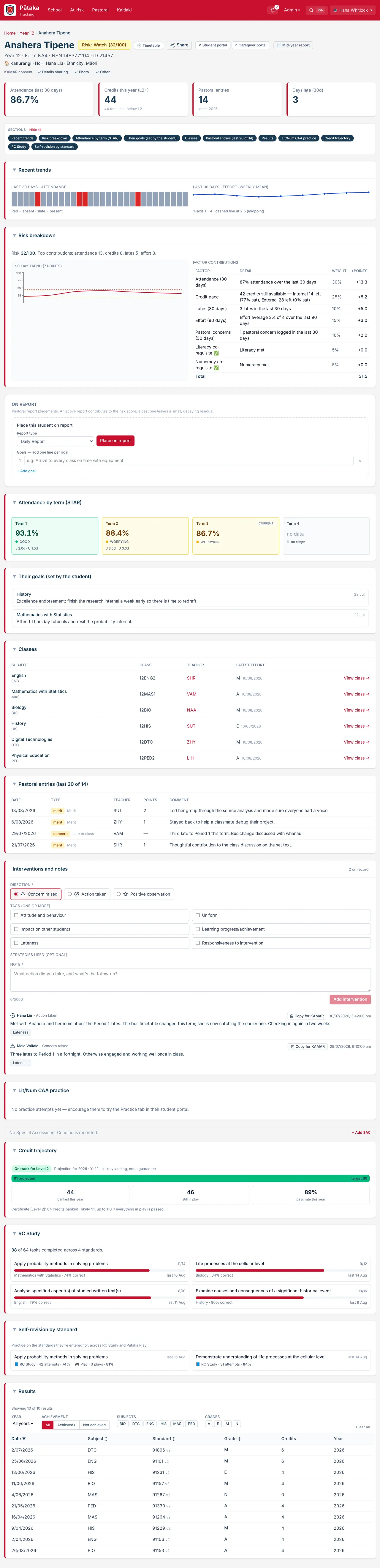
Pātaka in use: the staff home with today's calendar and pinned modules, then the whole-school overview, a search for a student, and that student's page.
This is the product itself, not a mock-up: the staff home, into tracking, a search, one student's page. Everything on this site is Pātaka running with a demonstration school and fictional people.
40 live modules In daily use at Rosehill College, Papakura.
3 front doors Staff, students and whānau, each with their own sign-in.
1 source of truth KAMAR stays your system of record. Pātaka reads it.
0 apps to install It runs in the browser and saves to a home screen.

Most schools run on systems that were never introduced to each other.

A student management system here. A forms tool there. Permission slips on paper, budgets in a spreadsheet, a quiz game on someone's credit card. Every one of them needs its own login, and none of them know what the others did.

Pātaka was built because a school got tired of that. A pātaka is a storehouse: one place where the tools and the information live together, on top of the data the school already keeps in KAMAR.

Designed, built and run every day at Rosehill College in Papakura, by the people who use it.

Student tracking

One page per student. Everything on it.

Search a name and the whole picture is there. It is the page staff open before a parent phone call, a report comment or a quiet word in the corridor.

  1. A risk score that shows its working

    Attendance, credit pace, lates, effort and pastoral concerns, each weighted and listed with what it added. Nobody has to trust a black box.

  2. Attendance, term by term

    Justified and unjustified absence kept apart, in the same four bands across the whole school, so "worrying" means the same thing to everyone.

  3. Their goals beside their classes

    What the student says they are aiming for sits next to what each of their teachers is seeing, with merits and concerns underneath.

  4. Notes that outlast a conversation

    Concerns raised, actions taken, good things noticed. Logged once by whoever was there and visible to everyone who works with that student.

  5. Credits, with a forecast

    Banked, still in play and likely to land, plus the practice they are actually doing. November stops being a surprise.

A student's page in Pātaka: a risk badge, attendance and credit tiles, a risk breakdown by factor, attendance by term, goals, classes, pastoral entries, interventions, a credit forecast and practice progress.

In practice

One Tuesday,
start to finish.

The same school day, in a school that runs on Pātaka. Six moments, six screens.

7.42am

Three teachers are away.

Relief comes through from KAMAR and lands on every teacher's home page: who is out, who is covering, which period. Today's duty and the approvals waiting on you sit right beside it.

The 'needs you today' rail on the staff home: a lunch duty, three absent teachers with their relievers, and seven approvals waiting.
10.13am

Year 10 Maths gets loud.

Pātaka Play turns revision into a live quiz on the board. Students join with a code on whatever device they have. No accounts and no subscription.

It is one of twelve teaching tools

A Pātaka Play game on the board: the lobby fills with players, an algebra question appears with four coloured answers, the answers come in, and the leaderboard is shown.
11.20am

A field trip fills up.

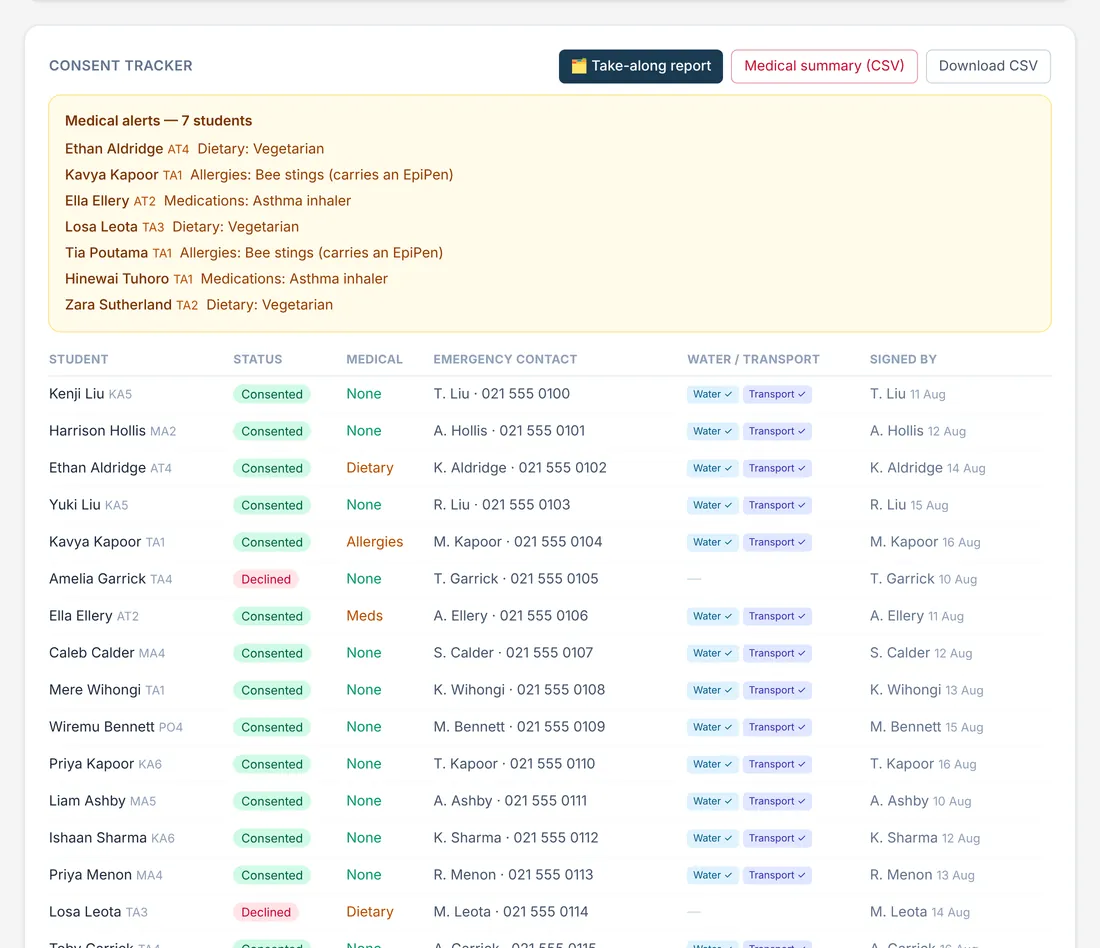
Caregivers sign the permission slip on their phone. Consent, medical notes and emergency contacts arrive in one tracker, ready to print as a take-along report.
How trips and consent work

The consent tracker for a geography field trip: medical alerts at the top, then each student's consent status, emergency contact and who signed.
11.52am

Year 11 sit a practice exam.

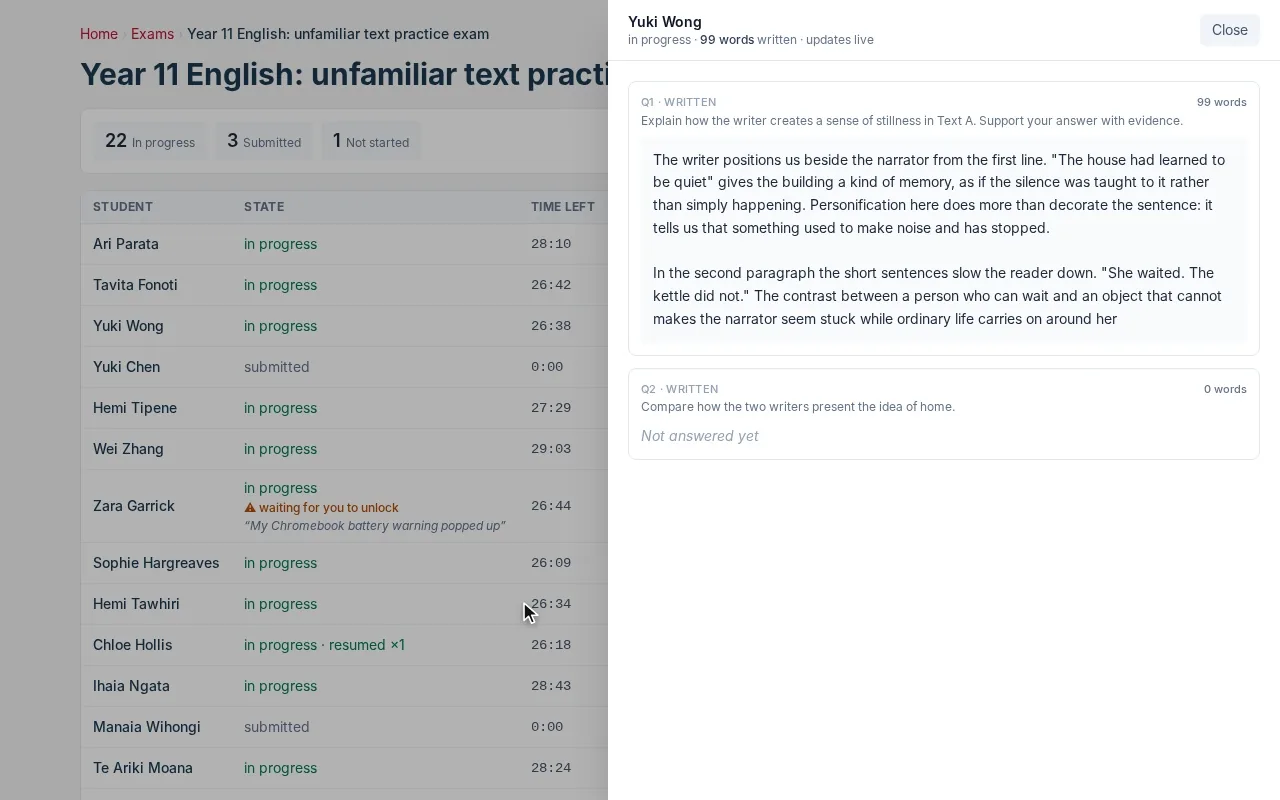
Devices are locked down and verified. The teacher watches every attempt live and can read an answer as it is being written. A student who leaves full screen has to say why.
How exams work

The exam invigilation view: a list of students with time left and device status, and a side panel showing one student's essay answer updating live.
2.10pm

A dean works her list.

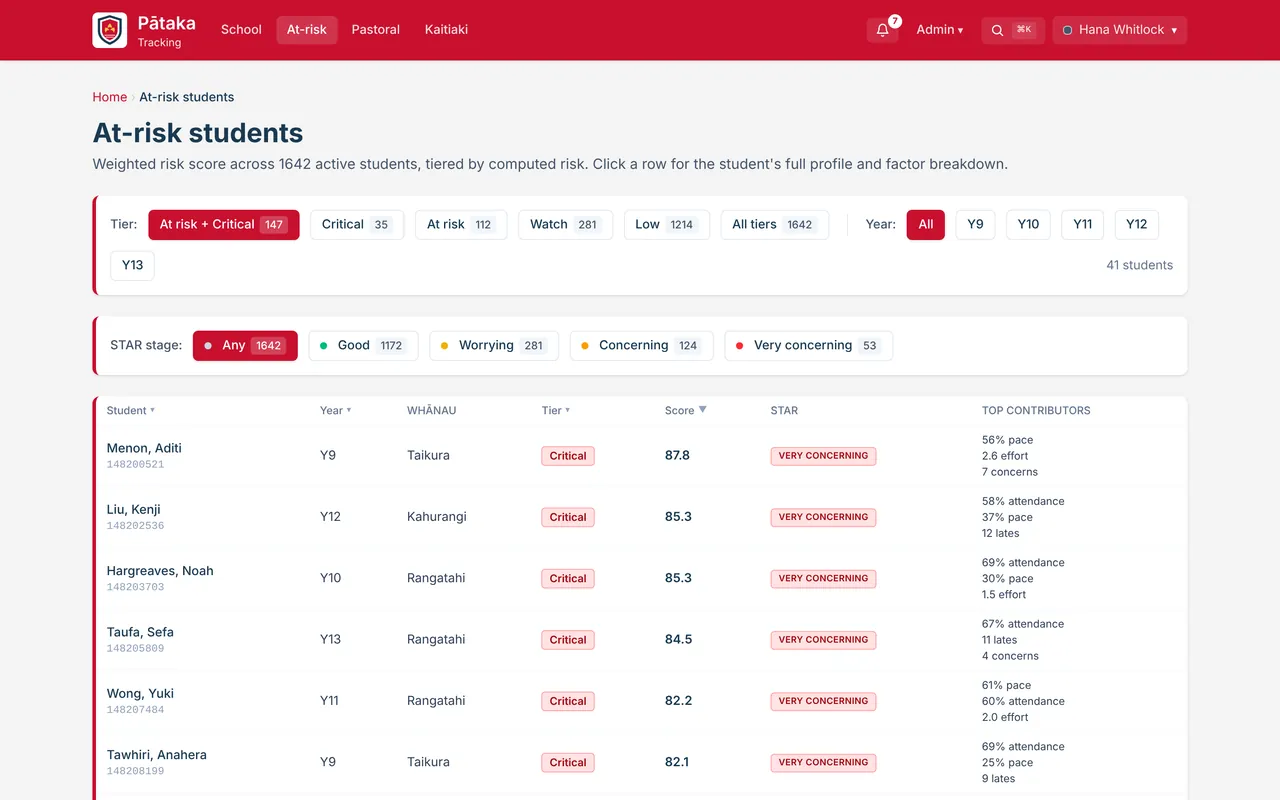
Every student who needs attention, ranked by score, with the things driving it beside each name. The first conversation starts in the right place.
How tracking works

The at-risk list: filters by tier and year level, then students ranked by risk score with their top contributing factors.
3.30pm

Next year's budget takes shape.

Budget holders enter their lines against categories that match Xero. Finance sees who has submitted and who has not, confirms each department, and exports the lot.
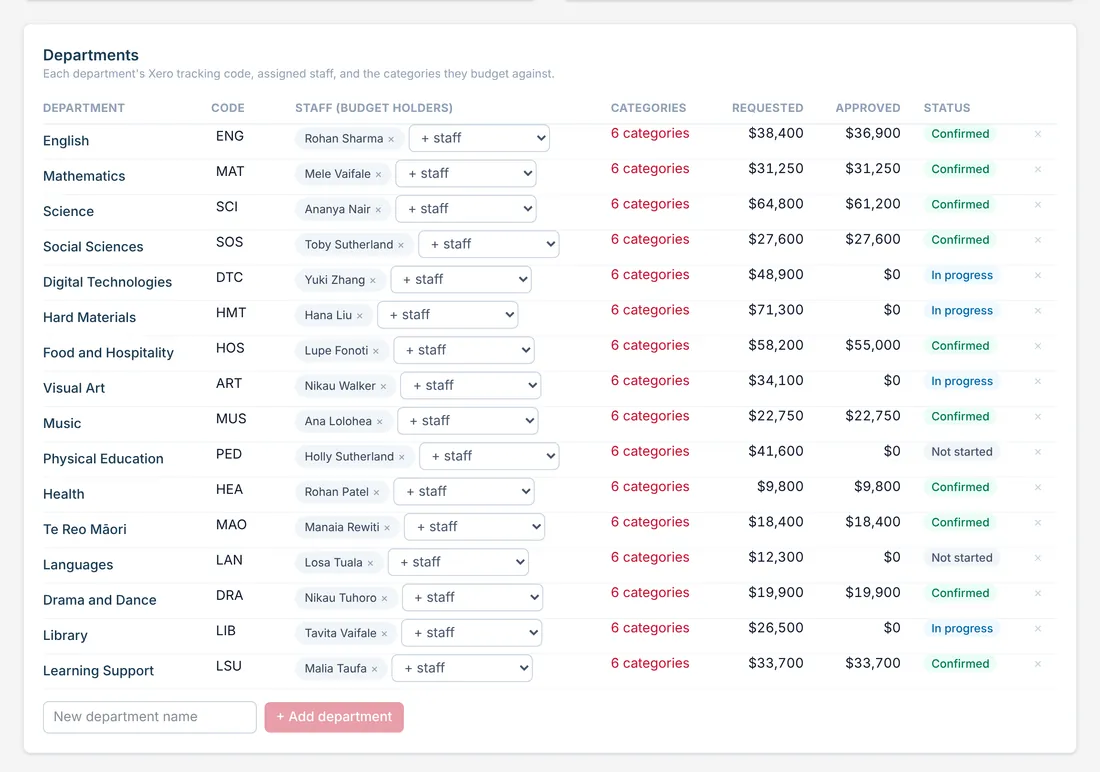
The budget review table: sixteen departments with their budget holders, requested and approved totals, and a status for each.

That was one day at someone else's school.

Tell us what yours looks like and we will show you the part of Pātaka that deals with it.

Book a demo

Go deeper

Four parts worth a closer look.

Forty modules is a lot to take in from one page. These four are the biggest, so each has its own walk-through.

The storehouse

Forty modules. One front door.

Everything below is live at Rosehill College today unless it says otherwise. Staff pin the ones they use, and only ever see the ones their role allows.

Teaching and learning

12
Tracking
Achievement, attendance, pastoral and risk for every student, by school, faculty, house and class.
Teacher's Planner
Your week, filled in from the timetable and the school calendar, with notes against each period.
Lesson Planner
Intentions, success criteria and a timed flow that adds up to the period. Print it or save it to Drive.
Exams
Locked-down online assessments with live invigilation, marking and an export for KAMAR.
Pātaka Play
Live quiz games on the board. Students join with a code and no login.
Study
Practice tasks for every standard a student is entered in, marked instantly, with insights for the teacher.
Literacy and numeracy
Auto-marked practice for the NCEA co-requisite, with reading passages and feedback on writing.
Form class
Your form class at a glance: attendance, who to keep an eye on, recent positives and birthdays.
Seating Plans
Drag students onto the room layout, group them into teams and award points for great work.
Whiteboard
Write on a blank page, or bring in a past paper as a PDF and annotate over it.
Interviews
Parent and teacher evenings, booked online by caregivers, with a schedule for every teacher.
Class balancer
Spread junior core classes evenly by contributing school, gender, pastoral need and ability.

Money and governance

3
Budgets
Budget holders submit lines by a deadline. Finance reviews, confirms and exports to Xero.
Board Dashboard
Senior NCEA achievement for the board, by year, ethnicity, gender and house, with the trend.
Parent Reports In development
Reports assembled from what Pātaka already holds: effort, attendance, NCEA and comments.

Students and whānau

8
Whānau portal
Progress, attendance, results, permission slips and payments for a caregiver's own children.
Student portal
My Kete: NCEA progress, today's timetable, exam countdowns, practice and careers.
Learning Support
The learner support register, with a plain "what helps" note for each student's teachers.
Re-enrolment
A live check of whether students meet the criteria for the subjects they chose for next year.
Absence reports
Absences reported by caregivers arrive as an office worklist and export to KAMAR.
Consent Forms
Permission for a film, a guest speaker or a short walk, without setting up a whole trip.
Email Caregivers
Email every caregiver, a year level or one form class, each family addressed individually.
Careers In development
Pathways, interests and careers interviews that follow a student across their years.

Trips, events and spaces

6
EOTC
Plan a trip, route it for approval, then collect consent and payment from caregivers online.
Calendar
Request a school event, see what is coming and read the fortnight ahead.
Tūtaki
Polls to find a time, sign-up sheets and booking pages that anyone can answer from a link.
Meeting Finder
See the periods when a group of staff are all free, then book it into everyone's calendar.
Facility Hire
Gym, field, room and van bookings from outside hirers, with approval and invoicing.
Trip payments
Card payments reconciled into a batch that imports straight into KAMAR.

Staff and growth

7
Relief board
Who is away and who is covering, on every teacher's home page before the first bell.
Duty Roster
The playground duty grid, built by the roster generator, with a reminder on the day.
Professional Growth
The growth record against the teaching standards, and appraisal for support staff, signed online.
HR
Vacancies, then onboarding a new hire: application, tax forms, ID uploads and e-signature.
Staff List
The staff directory, kept current from KAMAR.
Staff Leave
Leave by type across the year, with trends, for senior leadership only.
Admin Timeline
The term by term checklist heads of department work through, with oversight for leadership.

Admin and operations

6
Forms
Build a form, publish it, and let approvals route through as many stages as the process needs.
Send for Signature
Upload a PDF, add signers and get back a signed copy with a certificate.
Admin Hub
The staff handbook: policies, processes and how-to guides in one searchable place.
Health and Safety
Committee minutes and the action register.
Asset Register
Every asset by department, with location, owner and cost.
Feature Requests
Staff suggest improvements and vote on each other's. The most wanted get built first.

Students and whānau

Three front doors into the same storehouse.

Staff are not the only people who need a window in. Students and families get their own, built for a phone, showing only what is theirs.

The student portal on a phone: a greeting, shortcuts, NCEA exam countdowns, today's timetable with attendance, and credit progress.

Students: My Kete

Sign in with the school Google account. Credits against the target, today's timetable with attendance as the roll is marked, exam countdowns and practice that marks itself.

The whānau portal on a phone: a child's attendance and NCEA credits, buttons to report an absence and book interviews, and a permission slip needing action.

Whānau: no password to forget

Caregivers enter their email and get a secure link, or use the Google or Microsoft account they already have. They see their own children and nobody else's.

A caregiver signing a permission slip on a phone: trip details, what to bring, the risks, then give permission, type a name and submit.

The permission slip, finished

Everything a caregiver needs to decide, then consent, medical details and payment by card in one go. It reaches the teacher's tracker the moment they submit.

More about the portals

Integrations

It sits on what you already run.

Pātaka is not trying to replace your student management system, your identity provider or your accounts. It reads them, joins them up, and hands back clean exports.

  • KAMARStays the system of record. Anything going back is an explicit, reviewed export.
  • Microsoft Entra IDStaff single sign-on, with your existing multi-factor rules.
  • Google WorkspaceStudent sign-in, Classroom, Calendar and Drive.
  • XeroBudget categories match your chart of accounts and export for import.
  • WindcaveCard payments for trips, reconciled back to KAMAR.
  • PaperCutPrint spend by department, on the home page.
  • Safe Exam BrowserExams check the device is locked down, on laptops and managed Chromebooks.

Security and privacy

Student data is not a feature you bolt on later.

Scoped to the person

A classroom teacher sees the students they teach. A head of house sees their house. Senior leaders see the school. That is decided on the server for every request, not by hiding a menu item.

Your identity provider, not ours

Staff sign in through Microsoft Entra ID, so your conditional access and multi-factor rules apply. When someone is offboarded in your directory, their access to Pātaka ends with it.

KAMAR stays the truth

Pātaka mirrors your student management system and never quietly overwrites it. Anything that goes back is a named export that a person has looked at first.

Decisions leave a trail

Approvals, consent and sign-offs record who did them and when, so a question about a decision has an answer six months later.

Getting started

Getting your school onto it.

No big-bang migration. Modules switch on when you are ready for them.

01

Connect sign-in

Staff use their Microsoft account and students their Google account, with the policies you already enforce. There is no separate user list to maintain and no new password for anyone.

02

Connect KAMAR

Students, staff, classes, timetable and caregivers flow in from the system you already keep up to date. Roles follow the positions people hold, so a head of faculty sees faculty things from day one.

03

Switch on one module

Start where the pain is loudest. Forms and trips are good first moves, because the paper disappears straight away and nobody needs training to notice.

04

Shape it around your school

Staff suggest improvements from inside the platform and vote on each other's. Your processes stay yours, and the system bends to them rather than the other way round.

Fair questions

The things people ask first.

Does Pātaka replace KAMAR?
No. KAMAR stays your student management system and your system of record. Pātaka reads from it and builds the tools around it that KAMAR was never meant to be.
Do students or caregivers need to install anything?
No. Both portals run in the browser on any phone. If they want an icon, the portal shows them how to save it to the home screen.
Do we have to take all of it?
No. Start with the one or two modules that solve a problem you have this term, and add the rest when they earn their place.
Is it only for secondary schools?
It was built for a New Zealand secondary school on NCEA and KAMAR, with houses, faculties and a ten-day timetable. If that sounds like you, most of it fits as it is.
Who is behind it?
Nexus Education, in Auckland. Pātaka was built at Rosehill College by a teacher who also runs the school's IT, and it changes every week in response to what staff ask for.

Book a demo

Come and see it running.

A demo is the platform itself, not a slide deck. Tell us roughly what your school is wrestling with and we will show you the part of Pātaka that deals with it.

hello@nexuseducation.co.nz

We use what you send to reply to you, and for nothing else. Privacy